SPA II Updated New Features 1.2



1,415
32
1,415
32
SPA II Apartment & Garage: An update of I'm Not MentaL's Mod with important new features. Redesigned for SP Version 3856 based on I'm Not MentaL's open source code (on github).
Works in both Legacy and Enhanced
Credits
Bartholomew Ho / qiangqiang101 / I'm Not Mental - creator of this script.
ChangeLog for V1.2
- Added Settings.ini for users having issues with / to open menu, or just to change key to your liking/needs
- Added Offline Menu with functionality for users who want to play without MP maps enabled. You add the properties yourself but keep in mind this is only works for properties and garages that don't require MP maps enabled - which seriously limits the options. You update file called SPG.ini, SP examples inside.
Note: MP Maps are enable by default. They can be set to false in Config.ini.
New Features - Change Log vs Original
1. Compatible with current version of Legacy and Enhanced
2. Menu on keypress (broken iphone menu removed)
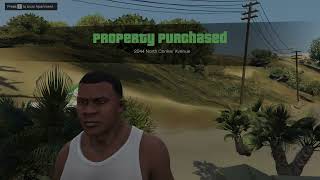
3. Teleport easily to your properties on purchase or on demand
4. Add cash easily from Menu
5. Add your own MLOs to Menu - like Malibu and Venice Beach Houses
6. New Markers - more discrete, more immersive markers (honestly, just get near the house or garage)
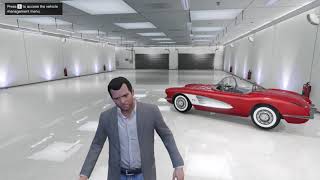
7. Many bug fixes including infinite loop leaving garage.
Requirements
1. Scripthookvdotnet 2 (yes version 2, not the nightly 3.x build - this mod goes back to 2015)
2. NativeUI
Disregard useless warnings from SHVDN. You can disable these in the ini file.
Yes, we should be using SVDN3 and LemonUI but at this time "if it ain't broke, don't fix it"
Installation
PropertyMgmt.dll goes in your Scripts folder (note: Scripts or scripts, doesn't matter)
Asset folder also goes in your Scripts folder
Make sure you have ScriptHookVDotNet2.dll in the GTA V parent/root folder (it is packaged with SHVDN3)
IMPORTANT: delete any existing SPA or SPAII.dll
New Users:
NativeUI.dll goes in your Scripts folder
ScriptHookVDotNet2.dll in GTA V root folder
Menu: use the T key by default, or change the key in Settings.ini
Config: is in Scripts/Assets/PM. Should be compatible with previous SPA II
Addons: file with examples is also in Scripts/Assets/PM.
Note: I removed debug code since the vast majority of users will never use it (including me).
Dev Notes
The script is highly complex and initially required 3 dlls in C# and 1 in vb.net.
To bring it up to 2025 (the year, not the version) I eliminated the 3 C# dlls - and no, it wasn't easy! Script was greatly simplified for FPS and stability:
Removed ifruitaddon2 - seriously conflicted with contacts in other scripts.
Removed INMNativeUI.dll - This is a fork, most people have NativeUI, why create another framework. Code changes made directly in new script
Removed Metadata.dll - just extra baggage, made changes to integrate into new script
Known Issues
The source code is circa 2015 with an update in 2020. You can imagine how many updates Rockstar made to the content and the RAGE engine since 2015. This means it ain't perfect and of course if your game is unstable this will not improve the stability. I'm a C# programmer and this is VB.Net, but I've spent hours testing and it's ready for production.
As in original mod, the sleep positions do not align properly with bed.
Original Mod had issues with other persistence mods. This one will likely have them as well.
Works in both Legacy and Enhanced
Credits
Bartholomew Ho / qiangqiang101 / I'm Not Mental - creator of this script.
ChangeLog for V1.2
- Added Settings.ini for users having issues with / to open menu, or just to change key to your liking/needs
- Added Offline Menu with functionality for users who want to play without MP maps enabled. You add the properties yourself but keep in mind this is only works for properties and garages that don't require MP maps enabled - which seriously limits the options. You update file called SPG.ini, SP examples inside.
Note: MP Maps are enable by default. They can be set to false in Config.ini.
New Features - Change Log vs Original
1. Compatible with current version of Legacy and Enhanced
2. Menu on keypress (broken iphone menu removed)
3. Teleport easily to your properties on purchase or on demand
4. Add cash easily from Menu
5. Add your own MLOs to Menu - like Malibu and Venice Beach Houses
6. New Markers - more discrete, more immersive markers (honestly, just get near the house or garage)
7. Many bug fixes including infinite loop leaving garage.
Requirements
1. Scripthookvdotnet 2 (yes version 2, not the nightly 3.x build - this mod goes back to 2015)
2. NativeUI
Disregard useless warnings from SHVDN. You can disable these in the ini file.
Yes, we should be using SVDN3 and LemonUI but at this time "if it ain't broke, don't fix it"
Installation
PropertyMgmt.dll goes in your Scripts folder (note: Scripts or scripts, doesn't matter)
Asset folder also goes in your Scripts folder
Make sure you have ScriptHookVDotNet2.dll in the GTA V parent/root folder (it is packaged with SHVDN3)
IMPORTANT: delete any existing SPA or SPAII.dll
New Users:
NativeUI.dll goes in your Scripts folder
ScriptHookVDotNet2.dll in GTA V root folder
Menu: use the T key by default, or change the key in Settings.ini
Config: is in Scripts/Assets/PM. Should be compatible with previous SPA II
Addons: file with examples is also in Scripts/Assets/PM.
Note: I removed debug code since the vast majority of users will never use it (including me).
Dev Notes
The script is highly complex and initially required 3 dlls in C# and 1 in vb.net.
To bring it up to 2025 (the year, not the version) I eliminated the 3 C# dlls - and no, it wasn't easy! Script was greatly simplified for FPS and stability:
Removed ifruitaddon2 - seriously conflicted with contacts in other scripts.
Removed INMNativeUI.dll - This is a fork, most people have NativeUI, why create another framework. Code changes made directly in new script
Removed Metadata.dll - just extra baggage, made changes to integrate into new script
Known Issues
The source code is circa 2015 with an update in 2020. You can imagine how many updates Rockstar made to the content and the RAGE engine since 2015. This means it ain't perfect and of course if your game is unstable this will not improve the stability. I'm a C# programmer and this is VB.Net, but I've spent hours testing and it's ready for production.
As in original mod, the sleep positions do not align properly with bed.
Original Mod had issues with other persistence mods. This one will likely have them as well.
पहले अपलोड: नवंबर 23, 2025
आखरी अपडेट: 9 दिन पहले
Last Downloaded: 13 कुछ मिनट पहले
75 टिप्पणियाँ
SPA II Apartment & Garage: An update of I'm Not MentaL's Mod with important new features. Redesigned for SP Version 3856 based on I'm Not MentaL's open source code (on github).
Works in both Legacy and Enhanced
Credits
Bartholomew Ho / qiangqiang101 / I'm Not Mental - creator of this script.
ChangeLog for V1.2
- Added Settings.ini for users having issues with / to open menu, or just to change key to your liking/needs
- Added Offline Menu with functionality for users who want to play without MP maps enabled. You add the properties yourself but keep in mind this is only works for properties and garages that don't require MP maps enabled - which seriously limits the options. You update file called SPG.ini, SP examples inside.
Note: MP Maps are enable by default. They can be set to false in Config.ini.
New Features - Change Log vs Original
1. Compatible with current version of Legacy and Enhanced
2. Menu on keypress (broken iphone menu removed)
3. Teleport easily to your properties on purchase or on demand
4. Add cash easily from Menu
5. Add your own MLOs to Menu - like Malibu and Venice Beach Houses
6. New Markers - more discrete, more immersive markers (honestly, just get near the house or garage)
7. Many bug fixes including infinite loop leaving garage.
Requirements
1. Scripthookvdotnet 2 (yes version 2, not the nightly 3.x build - this mod goes back to 2015)
2. NativeUI
Disregard useless warnings from SHVDN. You can disable these in the ini file.
Yes, we should be using SVDN3 and LemonUI but at this time "if it ain't broke, don't fix it"
Installation
PropertyMgmt.dll goes in your Scripts folder (note: Scripts or scripts, doesn't matter)
Asset folder also goes in your Scripts folder
Make sure you have ScriptHookVDotNet2.dll in the GTA V parent/root folder (it is packaged with SHVDN3)
IMPORTANT: delete any existing SPA or SPAII.dll
New Users:
NativeUI.dll goes in your Scripts folder
ScriptHookVDotNet2.dll in GTA V root folder
Menu: use the T key by default, or change the key in Settings.ini
Config: is in Scripts/Assets/PM. Should be compatible with previous SPA II
Addons: file with examples is also in Scripts/Assets/PM.
Note: I removed debug code since the vast majority of users will never use it (including me).
Dev Notes
The script is highly complex and initially required 3 dlls in C# and 1 in vb.net.
To bring it up to 2025 (the year, not the version) I eliminated the 3 C# dlls - and no, it wasn't easy! Script was greatly simplified for FPS and stability:
Removed ifruitaddon2 - seriously conflicted with contacts in other scripts.
Removed INMNativeUI.dll - This is a fork, most people have NativeUI, why create another framework. Code changes made directly in new script
Removed Metadata.dll - just extra baggage, made changes to integrate into new script
Known Issues
The source code is circa 2015 with an update in 2020. You can imagine how many updates Rockstar made to the content and the RAGE engine since 2015. This means it ain't perfect and of course if your game is unstable this will not improve the stability. I'm a C# programmer and this is VB.Net, but I've spent hours testing and it's ready for production.
As in original mod, the sleep positions do not align properly with bed.
Original Mod had issues with other persistence mods. This one will likely have them as well.
Works in both Legacy and Enhanced
Credits
Bartholomew Ho / qiangqiang101 / I'm Not Mental - creator of this script.
ChangeLog for V1.2
- Added Settings.ini for users having issues with / to open menu, or just to change key to your liking/needs
- Added Offline Menu with functionality for users who want to play without MP maps enabled. You add the properties yourself but keep in mind this is only works for properties and garages that don't require MP maps enabled - which seriously limits the options. You update file called SPG.ini, SP examples inside.
Note: MP Maps are enable by default. They can be set to false in Config.ini.
New Features - Change Log vs Original
1. Compatible with current version of Legacy and Enhanced
2. Menu on keypress (broken iphone menu removed)
3. Teleport easily to your properties on purchase or on demand
4. Add cash easily from Menu
5. Add your own MLOs to Menu - like Malibu and Venice Beach Houses
6. New Markers - more discrete, more immersive markers (honestly, just get near the house or garage)
7. Many bug fixes including infinite loop leaving garage.
Requirements
1. Scripthookvdotnet 2 (yes version 2, not the nightly 3.x build - this mod goes back to 2015)
2. NativeUI
Disregard useless warnings from SHVDN. You can disable these in the ini file.
Yes, we should be using SVDN3 and LemonUI but at this time "if it ain't broke, don't fix it"
Installation
PropertyMgmt.dll goes in your Scripts folder (note: Scripts or scripts, doesn't matter)
Asset folder also goes in your Scripts folder
Make sure you have ScriptHookVDotNet2.dll in the GTA V parent/root folder (it is packaged with SHVDN3)
IMPORTANT: delete any existing SPA or SPAII.dll
New Users:
NativeUI.dll goes in your Scripts folder
ScriptHookVDotNet2.dll in GTA V root folder
Menu: use the T key by default, or change the key in Settings.ini
Config: is in Scripts/Assets/PM. Should be compatible with previous SPA II
Addons: file with examples is also in Scripts/Assets/PM.
Note: I removed debug code since the vast majority of users will never use it (including me).
Dev Notes
The script is highly complex and initially required 3 dlls in C# and 1 in vb.net.
To bring it up to 2025 (the year, not the version) I eliminated the 3 C# dlls - and no, it wasn't easy! Script was greatly simplified for FPS and stability:
Removed ifruitaddon2 - seriously conflicted with contacts in other scripts.
Removed INMNativeUI.dll - This is a fork, most people have NativeUI, why create another framework. Code changes made directly in new script
Removed Metadata.dll - just extra baggage, made changes to integrate into new script
Known Issues
The source code is circa 2015 with an update in 2020. You can imagine how many updates Rockstar made to the content and the RAGE engine since 2015. This means it ain't perfect and of course if your game is unstable this will not improve the stability. I'm a C# programmer and this is VB.Net, but I've spent hours testing and it's ready for production.
As in original mod, the sleep positions do not align properly with bed.
Original Mod had issues with other persistence mods. This one will likely have them as well.
पहले अपलोड: नवंबर 23, 2025
आखरी अपडेट: 9 दिन पहले
Last Downloaded: 13 कुछ मिनट पहले
 5mods on Discord

Version 1.2. Added Settings.ini file to allow user to select the open menu key and remove issues with certain keyboards and the OEM key /. Also added menu option and functionality to add certain SP properties when MP maps are disabled.
@igaming94BHR you need to be more specific. not working doesn't help troubleshoot. As for latest DLC? If you mean certain properties are missing I would need to know which one because as per the description the last update was in 2020. I can add those but I need to know which ones are missing.
@DainHajek Great mod,thank you!!!.But for what its the option to add funds?it can be deactivated or something?
@Zazerim55 Thanks. The Add Funds adds $1,000,000 to your account each time you select it (i.e. press enter). To deactivate it is very simple, you just don't select it. If you want more control over the amounts use a trainer like Menyoo under Player Options Basic Stats. Or just ignore them both.
@DainHajek Your mod has a source code?
@Zazerim55 idk bro how do i get the source code
@DainHajek even with the settings.ini the menu never opens. I've tried three different keybinds.
@Zazerim55 https://github.com/qiangqiang101/SPA-II
@igaming94BHR https://github.com/qiangqiang101/SPA-II
@Slothigator I honestly don't know what to tell you.
would it be possible to have online interiors for some garages? for example adding Maze bank Office Garage or the Autoshop Garage etc.?
@zaur9002 I'm really not familiar with locations, not my thing. If you have the coordinates that would help. Then I would need to find the ipls and entity sets. Is this the garage you want? It seems to be Maze Garage but the Z coordinate at 200 really doesn't make any sense.
https://github.com/Bob74/bob74_ipl/blob/master/dlc_import/garage2.lua
Hello Man I am having ERR_GEN_MAPSTORE2 after puttin this in script folder any fixes ?
@KHADKU Ok so, let's start by saying GTAO and SP are distinct and starting SP in MP mode is kinda half assed. The good news, yeah it works, it's great. The bad news? Everyone is pushing MP scripts like Bennys and Open/Enable all interiors, including this script. Those are the suspects normally associated with this error message. Like all GTA V messages it is pretty damn useless. So what do you do? You might not be able to fix it but you can 100% find the cause.
1. First, go into the config.ini for the script and set OnLineMap = false. If it runs, you know it is MP Maps.
2. Identify any scripts (dll or asi) that enable MP maps by default. Disable them by changing the extension and see if this scripts runs with MP Maps enabled.
In summary, it is very likely you have a conflict with another script - a persistence script, garages, properties, etc...all playing with exactly the same resources and likely overlapping.
There is another possibility. When a game crashes, they can corrupt files. Particularly save game files. If you remove this script and the game still crashes then do a verify integrity and if necessary backup you save game and then delete the current one. Sorry I can't be more specific than that. I would need to sit at your computer to properly resolve the issue..but the process is always the same, you do it by elimination.
@DainHajek When I try to go bed,doesnt let me get out
@Zazerim55 This is a known issue. The bed is an animation. Get the original Menyoo, Player Options, Animations, Stop Animations. Pressing the E key several times might also work, or just teleporting. I'll work on a sleeping script one day, the ones uploaded here are terrible because they don't know how to identify a non vanilla bed.
@DainHajek ok,nice
@DainHajek When I use the Valet Service whit the same car more than 1 once appears the same vehicle but multiplied
@Zazerim55 The approach that was used in the original script was to clone the vehicle rather than remove it from the garage. This means that indeed the vehicles are duplicated. This could be fixed but there isn't much interest in this script, not enough to justify making these changes.
@DainHajek https://www.gta5-mods.com/scripts/single-player-benny-s-original-motor-works#comments_tab bro this is the mod
@DainHajek First, go into the config.ini for the script and set OnLineMap = false. If it runs, you know it is MP Maps. CAN YOU PLEASE EXPLAIN THIS MORE OPENLY I DONT HAVE BENNY GARAGE THOUGH